File Uploads, Notifications and Thumbnails
Settings for file uploads, file extensions, web-safe file names, email notifications and thumbnail generation.
Image Uploads
With Scale Uploaded JPEG Images, uploaded images are downscaled directly during upload to the Max. Img Width and Max. Img Height (in pixels, default 2000 px). Besides JPEG, PNG, GIF and WebP images are scaled as well. Smaller images are not changed. This requires the PHP extension gd.
File Extensions
- Blacklist File Ext: comma separated list of file extensions which must not be uploaded or created (default:
php,bat,bin,cmd,com,csh,exe,inf,msi,pif,scf,sh,vb,vbs,ws,wsf). - Whitelist File Ext: comma separated list of the only file extensions which are allowed. If empty, all extensions which are not blacklisted are allowed.
The black- and whitelist is active for uploaded, newly created and renamed files, not for existing files.
Web-safe File Names (new)
Setting: Web-safe File Names
Names of uploaded files (also of remote uploads) are converted into lowercase, web-safe names: umlauts and accents are transliterated, spaces and special characters become dashes. Examples:
Mein Foto.JPG→mein-foto.jpgMein Foto (1).JPG→mein-foto-1.jpgGröße Übersicht.PDF→groesse-uebersicht.pdf
This makes file links easier to share and avoids problems with special characters on web servers. Repository still asks before an upload overwrites an existing file with the converted name. Existing files are not renamed.
Email Notifications
With Send emails for file uploads, an email notification is sent if a new file was uploaded. The email contains the path of the uploaded file.
- To Address: email address where the notification emails are sent to.
- Send emails with same address: use the to address also as sender address.
- From Address: sender address of the notification emails (if "Send emails with same address" is not selected).
- Subject Upload: email subject for new file uploads (default: "New File Upload").
The emails are sent with the mail function of PHP. Please make sure that your hosting package allows sending emails, and use a from address of your own domain to avoid spam filtering.
Image Thumbnail Generation
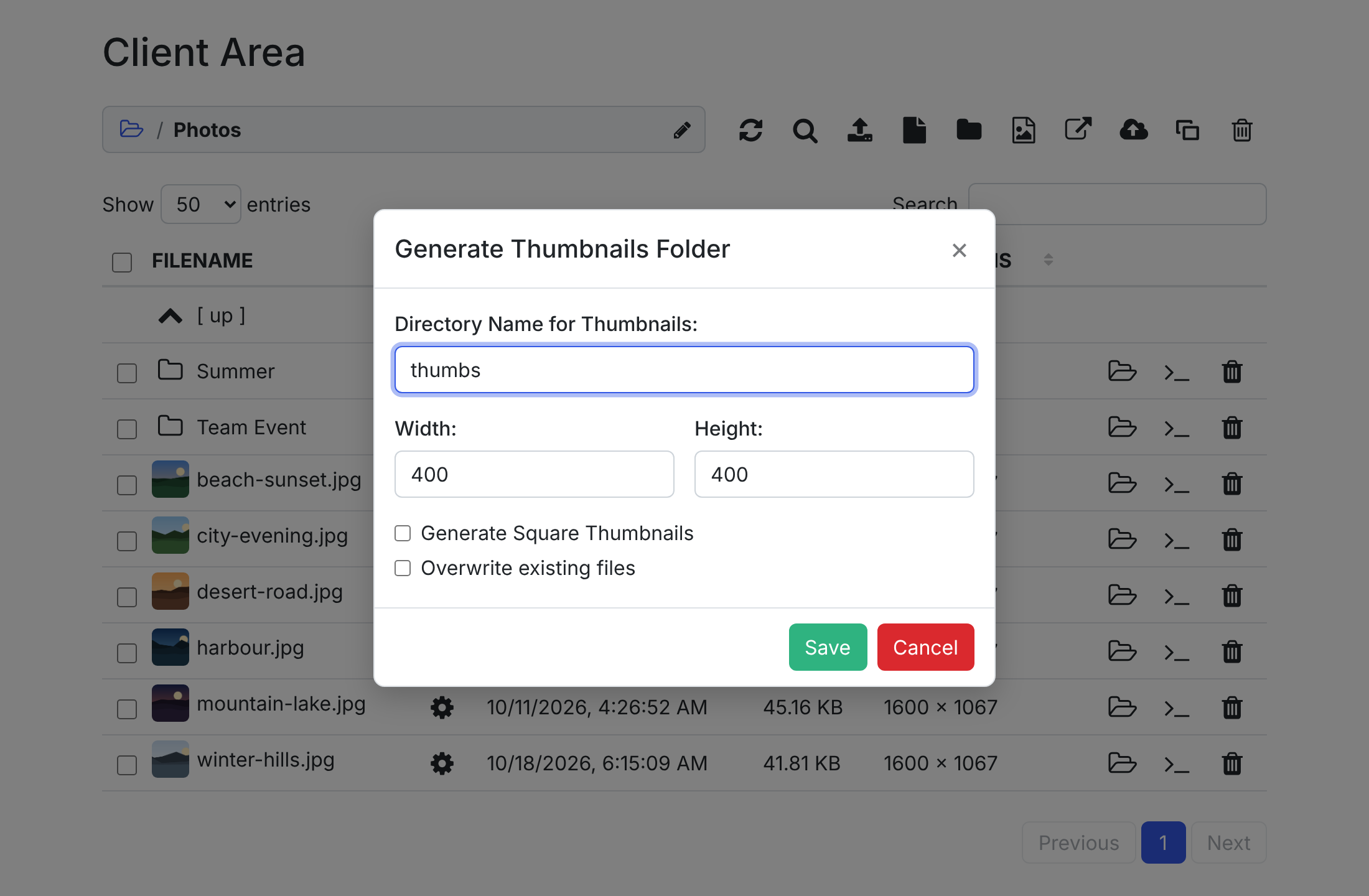
With the permission Create Thumbnails Directories, it is possible to generate a thumbnail subfolder (toolbar button or key T). During creation, a smaller sized thumbnail is generated for each JPEG, PNG and GIF image in the current folder. The dialog offers:
- Directory Name for Thumbnails: name of the new subfolder, e.g.
thumbs. - Width and Height: maximum size of the thumbnails.
- Generate Square Thumbnails: crop the thumbnails to squares.
- Overwrite existing files: generate thumbnails again for images which already have one.
This works smoothly together with Gallery Stack 3 or Iconic Gallery. It requires the PHP extension gd.